Getting started with Gunmark
Updated
Gunmark has three tabs at the bottom: Collection, Parts and Settings. Your firearms live in Collection.
Add your first firearm
- Open the Collection tab.
- Tap the + button in the top-right.
- Choose the type, then fill in what you know: make, model, caliber, serial number, nickname, and acquisition details.
- Save it.
Type-ahead suggestions for makes, calibers and models speed this up. Everything except the type is optional, and you can come back to any of it later.
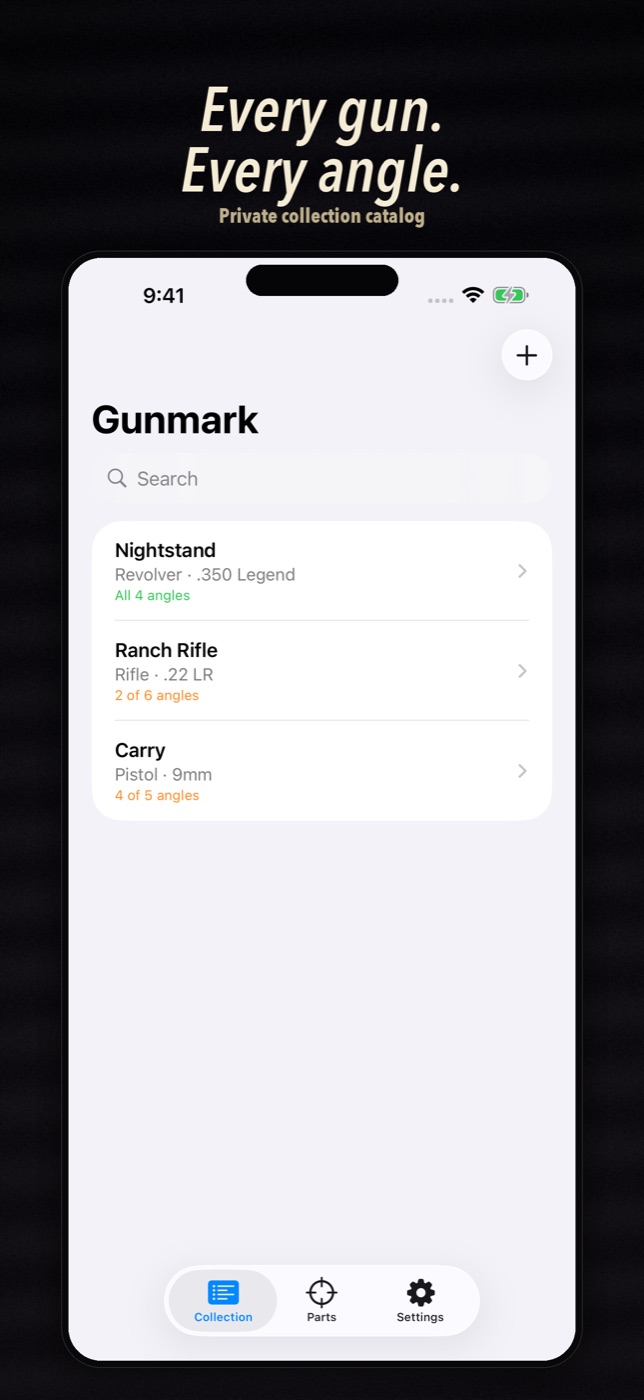
What the badge means
Each firearm in the list shows how many photo angles you have, like “2 of 6 angles”, and turns green with “All angles” when the checklist is done. Photo checklists covers this.
The free limit
Gunmark is free for your first three firearms, with every feature. To add a fourth you need Gunmark Pro, a one-time unlock. It is not a subscription. Viewing, editing and exporting are never locked behind it. See Pro and the free limit.
Where your data lives
On your iPhone. There is no Gunmark account and no Gunmark server. See privacy and security.
Still stuck?
Email support@bigbeardapps.com and a real person at Big Beard Apps, the studio behind Gunmark, will answer.
Email support